
문제 링크
https://swexpertacademy.com/main/code/problem/problemDetail.do?contestProbId=AV5PobmqAPoDFAUq#
SW Expert Academy
SW 프로그래밍 역량 강화에 도움이 되는 다양한 학습 컨텐츠를 확인하세요!
swexpertacademy.com
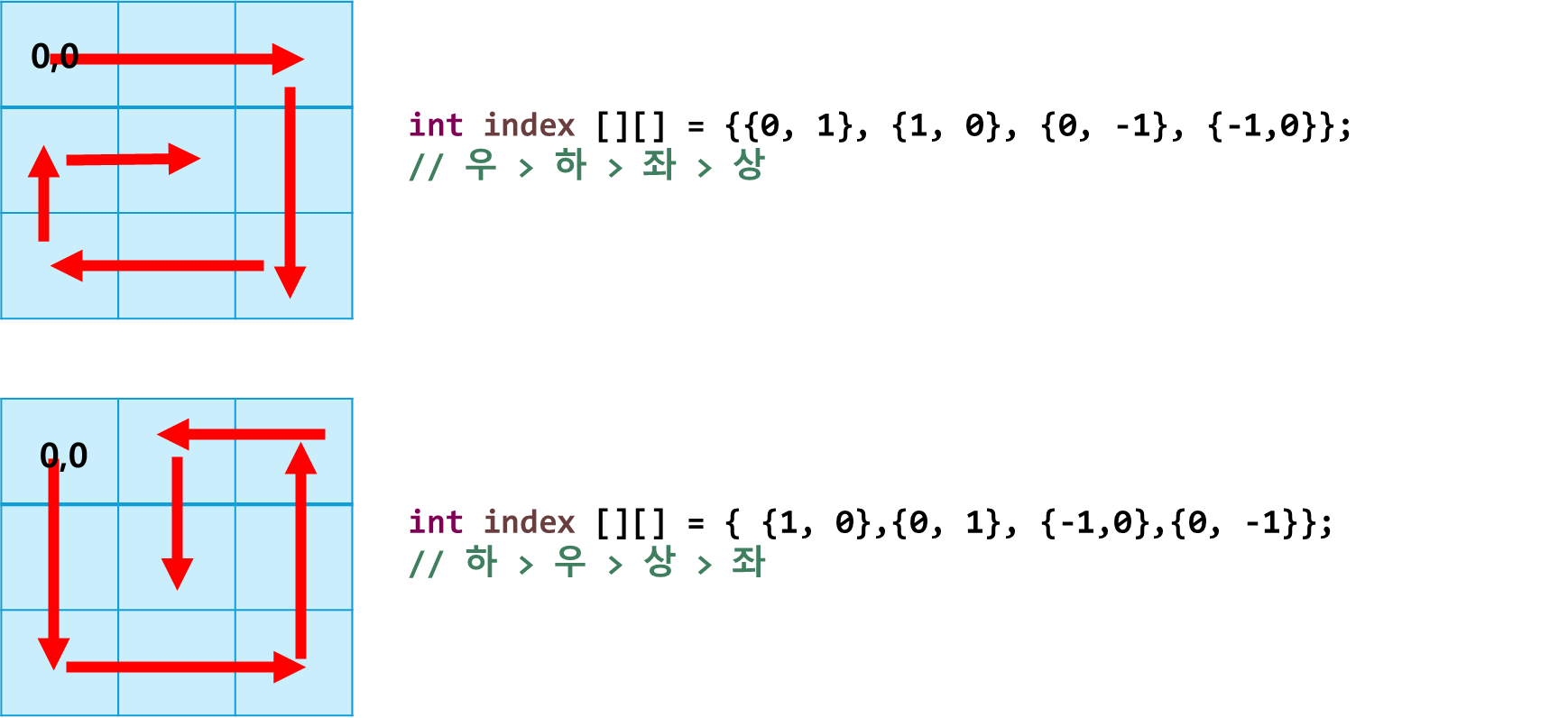
풀이 포인트 : 방향 벡터 설정
import java.util.Scanner;

class Solution
{
	public static void main(String args[]) throws Exception
	{

		Scanner sc = new Scanner(System.in);
		int T;
		T=sc.nextInt();

		// 각각의 테스트 케이스에 대해서 진행
		for(int test_case = 1; test_case <= T; test_case++)
		{
			int num = sc.nextInt(); // 달팽이의 크기 입력 받기
			int snail [][]= new int[num][num]; // num x num 사이즈의 배열 0으로 초기화

			// 이동 규칙 벡터
			int index [][] = {{0, 1}, {1, 0}, {0, -1}, {-1,0}}; // 우 > 하 > 좌 > 상
			//int index [][] = { {1, 0},{0, 1},   {-1,0},{0, -1}}; // 하 > 우 > 상 > 좌
			// 필요 변수 초기화
			// 현재 위치 표시용 now x, y
			int nx = 0;
			int ny = 0;
			// 이동 방향 더해주는 용도 // 처음 방향 우측
			int x = index[0][0];
			int y = index[0][1];
			// 방향 변환 확인용
			int change = 0;
			// 배열에 넣어줄 숫자
			int n  = 1;

			// 종료 조건: 마지막 칸 도달 시
			while(n <= num*num) {
				// 값 넣어주기
				snail[nx][ny] = n;
				// 값 증가
				n++;
				// 이동 예정 부분 확인용
				int nextX = nx + x;
				int nextY = ny + y;
				if(nextX>=num || nextY>=num || nextX<0 || nextY<0 || snail[nextX][nextY] !=0) {
					// 범위 밖이거나 || 이미 채워져 있는 곳이라면
					// 방향 전환
					change = (change+1) % 4;
					// 전환된 방향으로의 벡터 넣기
					x = index[change][0];
					y = index[change][1];
				}
				// 이동 해주기
				nx = nx +x;
				ny = ny +y;


			}

			System.out.printf("#%d", test_case);
			System.out.println();
			for(int i = 0; i<num; i++) {
				for(int j =0; j < num; j++) {
					System.out.print(snail[i][j]+" ");
				}
				System.out.println();
			}


		}
	}
}
아래는 방향 벡터를 dx, dy를 나누어 사용하는 방법이다
import java.util.Scanner;

class Solution
{
	public static void main(String args[]) throws Exception
	{

		Scanner sc = new Scanner(System.in);
		int T;
		T=sc.nextInt();

		for(int test_case = 1; test_case <= T; test_case++)
		{
			// 테스트 케이스마다 정수 N을 입력 받는다
			int num = sc.nextInt();
			int snail[][] = new int[num][num]; // num x num 크기로 배열 0으로 초기화

			// 필요 변수
			int x = 0; // now x 초기는 0,0시작
			int y = 0; // now y 초기는 0, 0 시작

			int direction = 0; // 방향전환
			// 방향 지정 우 0, 1 => 하 1, 0=> 좌 0, -1=> 상 -1, 0
			int dx[] = {0, 1, 0, -1};
			int dy[] = {1, 0, -1, 0};

			// 값
			int n = 1;

			// 다음 이동 확인 변수
			int nextX = 0;
			int nextY = 0;


			while(n<=num*num) {
				// 모든 배열 다 도달할 때까지
				snail[x][y] = n++; // 값 넣어주고 n 증가

				// 이동 예상 지점 확인해주는 과정
				nextX = x + dx[direction];
				nextY = y + dy[direction];
				if(nextX <0 || nextX>=num || nextY<0 || nextY>=num || snail[nextX][nextY]!=0) {
					// 배열 영역을 벗어나거나 이미 배열에 차있으면 방향 전환
					direction = (direction + 1) % 4;
				}
				// 진짜로 이동
				x = x + dx[direction];
				y = y + dy[direction];

			}

			// 전부 이동 후
			System.out.printf("#%d", test_case);
			System.out.println();
			for(int i =0; i<num; i++) {
				for(int j = 0; j<num; j++) {
					System.out.print(snail[i][j] +" ");
				}
				System.out.println();
			}
		}
	}
}
번외: 토네이도
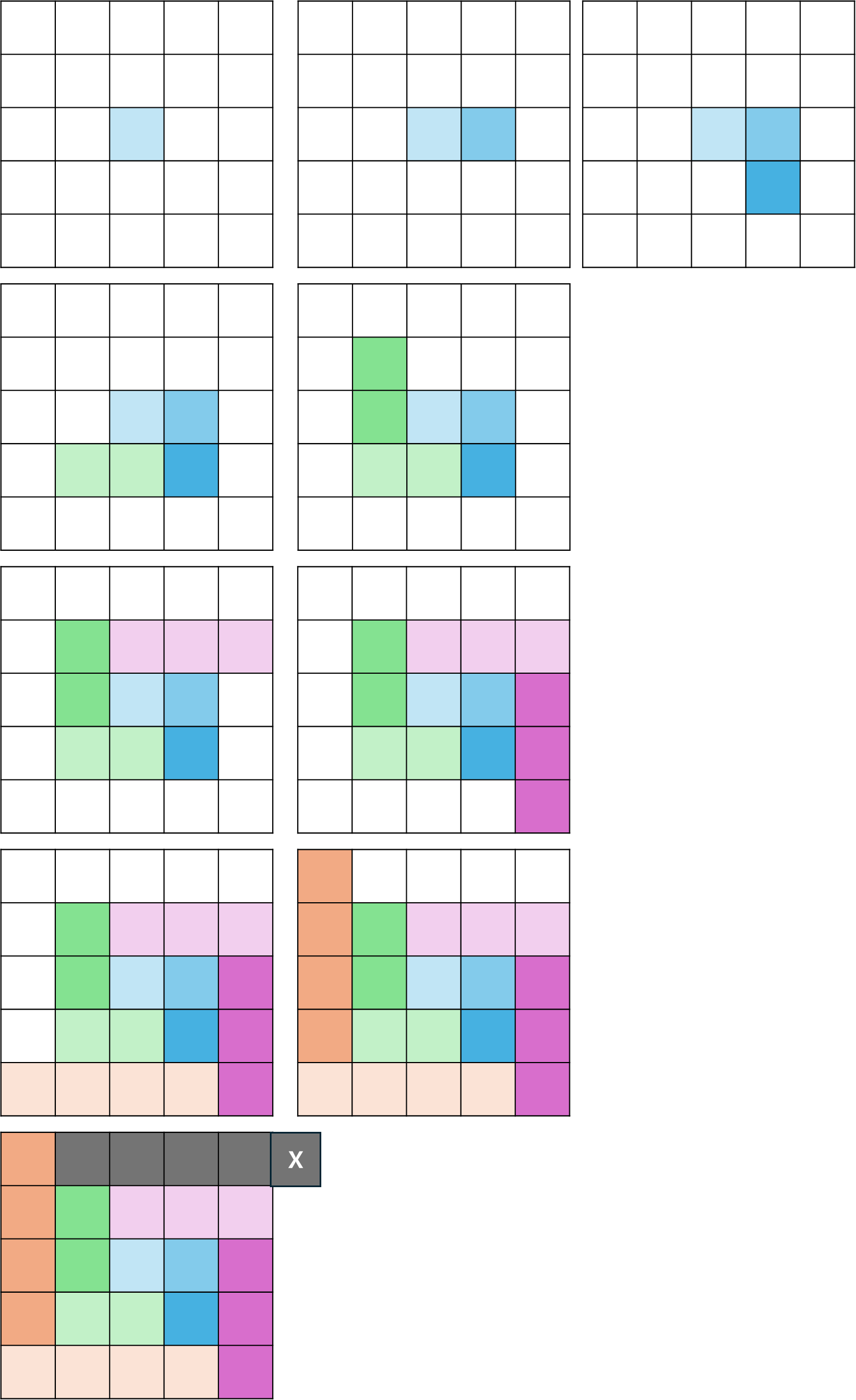
- 달팽이가 밖에서 안으로 들어간다면 토네이도는 안에서 밖으로 나오는 방법입니다.
토네이도 모양으로 숫자를 채우기 위해서는 다음과 같은 알고리즘이 사용됩니다:
- 배열의 크기를 입력 받습니다.
- 중앙에서 시작하여 배열을 채우기 시작합니다.
- 각 숫자를 채우면서 이동 방향을 조절합니다. 이동 방향은 우측 → 하단 → 좌측 → 상단 순으로 이동합니다.
- 좌우로 이동하는 경우, 이동 거리를 1씩 증가시킵니다.
- 모든 배열을 채울 때까지 위 과정을 반복합니다.
아래는 코드 상에 있는 moveDistance가 왜 좌, 우로 가는 방향일 때 늘어나는지 알기 쉽게 그려본 그림이다.
import java.util.Scanner;

class Solution
{
	public static void main(String args[]) throws Exception
	{

		Scanner sc = new Scanner(System.in);
		int T;
		T=sc.nextInt();

		for(int test_case = 1; test_case <= T; test_case++)
		{
			// 배열의 크기를 입력 받음
			int num = sc.nextInt();
			int tornado[][] = new int [num][num]; // numxnum사이즈로 tornado 0으로 초기화

			int x = num/2; // 토네이도의 중앙
			int y = num/2; // 토네이도의 중앙을 시작 지점으로 설정

			int direction = 0; // 방향전환

			// 이동 규칙 벡터  우 하 좌 상
	        int[] dx = {0, 1, 0, -1};
	        int[] dy = {1, 0, -1, 0};

	        // 배열에 넣을 값
	        int n = 1;

	        int nextX = 0;
	        int nextY = 0;

	        int filledCells = 0; // 채워진 칸 수
	        int moveDistance = 1; // 이동거리
	        while(n <= num*num) {
	        	// 모든 배열 다 돌면 끝남 // 홀수 배열일 때를 가정
	        	tornado[x][y] = n++; //넣고 1 증가
	        	filledCells++;

	        	//이동해주기
	        	x+=dx[direction];
	        	y+=dy[direction];

	        	// 각 방향으로 이동해야 한만큼 이동하면
	        	if(filledCells == moveDistance) {
	        		filledCells = 0; // 초기화
	        		// 방향 전환
	        		direction = (direction +1)%4;

	        		// 만약 좌, 우 방향이면 이동거리 증가
	        		 if (direction == 0 || direction == 2) {
	                        moveDistance++;
	                    }
	        	}
	        }


			// 전부 이동 후
			System.out.printf("#%d", test_case);
			System.out.println();
			for(int i =0; i<num; i++) {
				for(int j = 0; j<num; j++) {
					System.out.print(tornado[i][j] +" ");
				}
				System.out.println();
			}
		}
	}
}
'코딩테스트 > SWEA' 카테고리의 다른 글
| [SWEA] 1974. 스도쿠 검증 D2 - 자바(Java) (1) | 2024.05.18 |
|---|---|
| [SWEA] 1926. 간단한 369게임 D2 - Java 자바 (0) | 2024.05.17 |